




Knowing how to choose an AI tool for marketing automation is harder than it sounds. There are multiple platforms making similar promises, and most buying decisions come down to a demo that looked impressive rather than a clear match between the tool and the actual problem. A Gartner survey of 413 marketing technology leaders found that 45% say the AI tools they bought failed to deliver the business results vendors promised.
This guide walks you through five steps to evaluate, compare, and choose an AI marketing automation tool that fits how your business runs.
Key Takeaways
- Most businesses buy AI marketing tools before defining the problem they need solved, which is the most expensive mistake in the process
- The type of tool matters as much as the features inside it: a workflow automation tool and an all-in-one AI workspace solve different problems
- Five criteria should drive every evaluation: integration depth, adaptability, data privacy, setup needs, and the real total cost
- For mid-sized B2B businesses with specific operational workflows, a custom AI system will consistently outperform a generic platform configured to do the same job
What AI Marketing Automation Means in 2026
Marketing automation has been around for years. What changed is what the word "automation" now covers.
The old version ran on fixed rules. Send an email three days after a sign-up. Move a contact to a new list if they click a link. Tag them if they visit the pricing page. These rules work until a prospect does something you did not plan for, and then the whole sequence breaks down.
AI marketing automation is different because it responds to what happens rather than what you assume would happen. It reads behavioral signals, adjusts timing and messaging based on patterns, scores contacts as new data comes in, and makes decisions in real time without someone having to log in and update a rule. The more it runs, the better it gets.
For a mid-sized B2B business, that distinction matters for one practical reason: your team does not have time to manage a system that breaks every time a prospect goes off-script. The goal is automation that handles the variance, not one that needs constant fixing.
Step-by-step Guide on How to Choose an AI Tool For Marketing Automation
Choosing the right tool is a process, not a gut call. The steps below take you from defining your actual problem to making a confident decision, without getting distracted by features you do not need or demos designed to impress rather than inform.
Step 1: Define What You Need Automation to Fix
Buying a tool before you know what problem you are solving is an expensive way to learn that lesson. Before you look at a single platform, answer these three questions:
- Where is your team losing the most time right now? Be specific. "We spend four hours a week manually following up with leads who went quiet" is a real answer. "Marketing takes too long" is not something any tool can fix.
- Which of those tasks are repetitive enough to hand off to a system? Anything that follows a pattern, happens on a schedule, or involves moving data between tools is a good starting point. Tasks that need judgment, creativity, or relationship context should stay with a person.
- What would success look like in 90 days? Pick one metric and commit to it. More meetings booked, fewer hours on manual follow-up, faster content output. One clear outcome keeps the evaluation grounded and gives you something real to measure after you buy.
The answers to these three questions should drive every decision that follows. If a tool cannot directly address what you wrote down, it is not the right tool, regardless of how good the demo looks.
Step 2: Know Which Category of Tool You Need
Most AI marketing tools look similar on the surface. They all promise to save time, improve results, and connect to your existing stack. The difference shows up when you dig into what they do, and whether that matches your problem.
There are six broad categories worth knowing before you start comparing platforms:
- Workflow and task automation tools: Connect your apps and automate repetitive processes between them. When a new lead fills out a form, the tool automatically adds them to your CRM, sends a notification to your sales rep, and enrolls them in a follow-up sequence. Zapier and Make are common examples.
- Content and copy AI: Drafts blog posts, email copy, social captions, and ad creative from a brief or prompt. Good for teams that need to produce more content without adding headcount. Jasper is a widely used option in this category.
- Social media automation: Handles content scheduling, publishing, and sometimes creation across platforms based on your audience data and posting history rather than a manual calendar.
- Market and competitor intelligence tools: Monitor industry news, competitor activity, and buyer intent signals continuously, surfacing information your team can act on without spending hours doing manual research.
- Pipeline and follow-up automation: Focuses specifically on keeping leads moving through your funnel, sending behavior-adaptive sequences, and routing engaged contacts to your sales team.
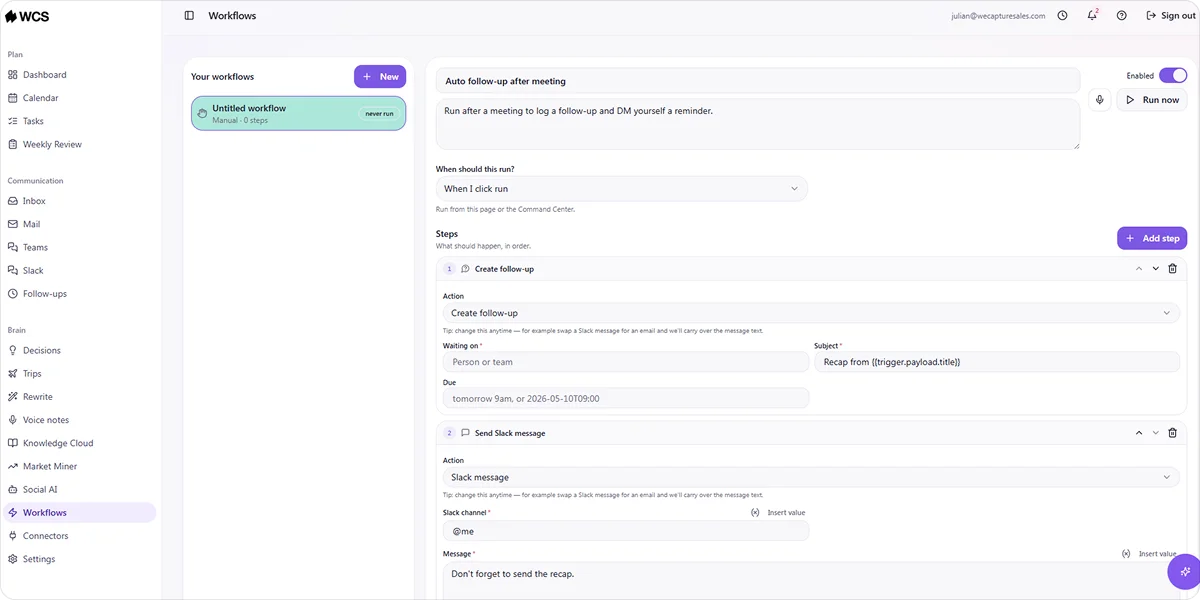
- All-in-one AI workspaces: Combine several of these functions in a single platform, covering communication, task management, content, and automation from one place rather than a stack of separate tools.
Knowing which category your problem falls into helps you evaluate tools more clearly. Some platforms specialize in one function. Others, like all-in-one AI workspaces, cover several at once, which matters if your team is currently juggling multiple separate tools to do the same job.
Step 3: Evaluate These Five Criteria Before You Commit
Finding a tool that looks good in a demo is easy. Finding one that still works three months into production is a different exercise. Before you commit to anything, run every platform you are considering through these five criteria.
Native Integration With Your Existing Stack
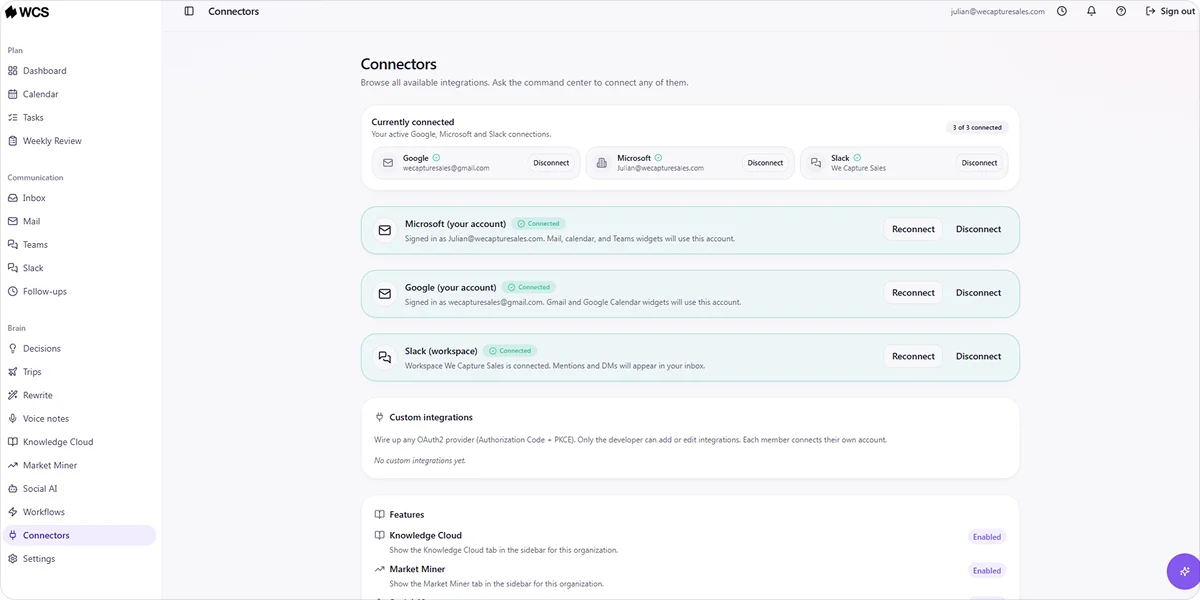
The first thing to check is whether the tool connects directly to what your team already uses: your CRM, email client, calendar, Slack, and any other tools your workflows depend on. Every connection that runs through a middleware layer like Zapier rather than a native integration is a potential point of failure, and failures in automation tend to go unnoticed until they have already cost you leads or data.
A platform with a dedicated connectors view, where you can see every active integration and its status in one place, makes this significantly easier to manage as your stack grows. Our AI Office, for example, includes a Connectors section that gives you visibility across all connected tools from a single screen rather than hunting through settings to check what is live.
Adaptability
There is a real operational difference between a tool that fires the same sequence regardless of what a prospect does, and one that adjusts based on what actually happens. If someone replies to your third email asking for a demo and the system sends them follow-up four anyway, that is not automation working for you.
When you are evaluating any platform, ask vendors to show you specifically how the system responds to different prospect behaviors, not just how it sends a sequence on a schedule. Behavior-adaptive tools require less manual intervention over time and produce better results as the system accumulates more data on what works.
Data Privacy and Hosting
This one is worth asking directly rather than assuming the answer. Who hosts your data? Where is it stored? Is it used to train any shared AI models? For B2B businesses handling client information or operating in regulated industries, the answers to these questions matter considerably more than most vendors volunteer upfront.
Some platforms process your data through shared cloud infrastructure where it contributes to model training across their entire customer base. Others, like We Capture Sales, run every client on an isolated, private AWS infrastructure where data is never sold, shared, or used to train public models. The difference is worth understanding before you sign.
Configuration and Ongoing Maintenance
Pay close attention to what the vendor describes as the setup process, and then ask what happens six months after go-live. Some platforms are genuinely self-serve with minimal ongoing maintenance. Others involve a light initial setup that quietly becomes a significant ongoing commitment as your workflows change, integrations need updating, and new use cases come up.
A useful question to ask in any vendor conversation is: "If we need to change how this workflow runs in three months, what does that process look like and who does it?" The answer tells you more about the real cost of ownership than the pricing page will.
Total Cost of Ownership
The monthly subscription is rarely the full picture. Add implementation time, required add-ons, any tools you still need to run alongside the platform, and the internal hours your team will spend managing and maintaining the system. For teams currently paying for four or five separate tools, it is also worth mapping out what an all-in-one platform replaces, since consolidation often changes the cost comparison significantly.
Step 4: Run a Proper Evaluation Before You Buy
A free trial or demo is your opportunity to pressure-test whether a tool solves your problem before you commit budget to it. Most buyers treat this stage too casually and end up discovering the gaps after they have already signed.
Here is how to make the evaluation count:
During a free trial:
- Recreate one real workflow from your business, not a simplified demo version. If it breaks or requires workarounds, that tells you something the sales team will not.
- Invite the person who will use it day to day, not just the decision maker. Ease of use looks different depending on who is doing the work.
- Check what happens when something goes wrong. Trigger an error intentionally and see how the tool handles it.
During a vendor demo:
- Ask them to show you a workflow that matches your specific use case, not their standard presentation flow.
- Ask directly: what does setup take, and what ongoing maintenance should we expect after go-live?
- Ask for a customer reference in a similar industry or company size. A vendor confident in their product will not hesitate.
Red flags to walk away from:
- The demo only shows best-case scenarios with no discussion of limitations
- Pricing is vague until you are deep in the sales process
- The vendor cannot clearly explain where your data is stored and how it is used
- Post-sale support is light or only available at a higher pricing tier
Step 5: Decide Whether You Need a Platform or a Custom System
This is what most buyers never consider, and it is often the one that matters most. Self-serve platforms work well when your workflows are straightforward, your team has the capacity to configure and maintain the tool independently, and your processes fit reasonably well within what the platform was built to do. For a lot of businesses, that is a perfectly good fit.
The case for a custom system comes down to a few specific situations:
- Your workflows are complex enough that every platform you evaluate requires significant workarounds to get close to what you need
- Your team does not have the internal capacity to build, maintain, and optimize automation infrastructure on top of their existing work
- You are dealing with sensitive data that cannot pass through third-party hosted platforms
- You need several automation functions covered, and the cost and complexity of managing multiple separate tools is becoming its own problem
The honest tradeoff is that a custom system requires a higher upfront investment and a discovery process before anything goes live. What you get in return is a system built around how your business operates, with support that continues after go-live rather than a platform handed over for your team to figure out.
How We Capture Sales Builds the System Around You
Most tools ask you to adapt your workflow to fit the platform. We Capture Sales works from the other direction.
Every engagement starts with a one-on-one discovery conversation before anything is built. The goal is to understand your specific workflows, your existing data, and where automation would move the needle for your business. What comes out of that process is a custom AI system designed around how you operate, not averaged across thousands of other customers.
The platform is called Our AI Office, and it brings together the functions that B2B teams need most in a single workspace:
- Pipeline Revival: Ingests your CRM or CSV contact data and runs adaptive email and SMS follow-up sequences, routing engaged prospects to booked meetings without manual handoff
- Social AI: Handles content creation and publishing tied to your actual market positioning, keeping your brand active across platforms without your team doing it manually each week
- Market Miner: Monitors competitor activity, buyer intent signals, and market movements continuously, surfacing intelligence your team can act on
- Rewrite: Polishes emails, messages, and documents using AI: you pick a tone and length, and the tool refines the copy without changing what you are trying to say
- Decisions: Gives you a structured second opinion on choices you are weighing. You describe the situation and upload any relevant notes, data, or documents, and the system helps you think through it clearly
- Knowledge Cloud: Centralizes your internal business knowledge and makes it available across every AI system running your workflows
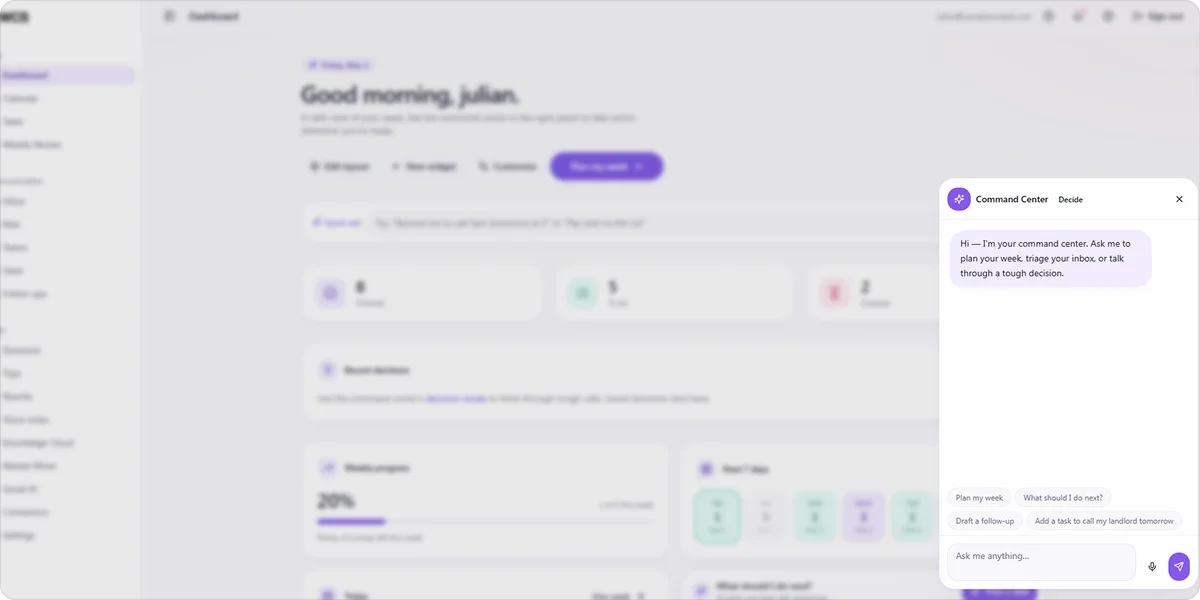
- Command Center: Lets you send plain-language instructions to the AI, which then executes tasks across your connected tools without you having to navigate between platforms
Every solution runs on private, AWS-based infrastructure. Your data is never sold, shared, or used to train public AI models. Support continues after go-live, with ongoing refinement as your business evolves.
If you are working through this decision and want to talk through what a custom system would look like for your business, contact us to schedule a meeting.
Frequently Asked Questions
How do I know if I am ready for AI marketing automation?
If your team regularly loses time to tasks that follow a clear pattern, follow-up emails, lead routing, content scheduling, or manual reporting, you are ready. You need a specific problem, usable data, and a clear picture of what you want the automation to handle.
What is the difference between a marketing automation platform and a custom AI system?
A platform is a self-serve product you configure within its existing limits. A custom AI system is built around your specific workflows and goals from the ground up, with ongoing support rather than a tool your team maintains independently.
How long does it take to see results from AI marketing automation?
Pipeline revival and lead follow-up tend to show results within the first few weeks because they work on contacts already in your pipeline. Content and social automation take longer as results build over time. Starting with one specific problem rather than automating everything at once gets you to results faster.


