




Most businesses pick a CRM based on price or feature list. The decision that actually matters is fit. A pre-built CRM is built for a broad range of sales processes. A custom CRM is built around yours specifically.
The global CRM market is expected to grow from $126.17 billion in 2026 to $320.99 billion by 2034. With that level of investment flowing into CRM tools, the question for most growing businesses is no longer whether to use a CRM, but which type actually fits how their team sells.
This article covers the advantages and disadvantages of both options and how to identify which one fits your business before committing to either
Key Takeaways
- The right CRM is the one that fits how your sales team operates, not the one with the most features
- Pre-built CRMs deploy fast and cost less upfront. Custom CRMs cost more initially but stabilize over time as your team grows
- Per-seat pricing on pre-built platforms compounds quickly. A custom CRM has no per-seat costs
- For businesses handling sensitive data or running specific sales workflows, data ownership and workflow fit often determine the decision
- A custom CRM requires a capable development partner. The quality of the build depends entirely on who builds it
What Is a Custom CRM?
A custom CRM is built from scratch around your specific sales workflows, data structure, and business logic. Your team owns the code, the data, and the system architecture. Nothing about it depends on a vendor's pricing decisions or platform roadmap.
A complete custom CRM engagement typically covers:
- Discovery and workflow mapping: Your sales process gets mapped before any development begins
- System architecture: The data structure, user permissions, and integrations are designed around how your team operates
- Tool integrations: The CRM connects to your email, outreach tools, and any internal systems your workflows run through
- Post-launch refinement: The system gets improved after go-live as your sales process evolves
What Is a Pre-Built SaaS CRM?
A pre-built SaaS CRM is a subscription-based platform built for a broad range of businesses. HubSpot, Salesforce, Pipedrive, and Zoho are among the most widely used. The vendor handles infrastructure, updates, and maintenance. Your team configures the platform to fit your workflows as closely as the tool allows.
Most pre-built CRMs include the following out of the box:
- Contact and deal management
- Pipeline tracking across defined stages
- Email integration and activity logging
- Reporting and dashboards
- Basic workflow automation
The tradeoff is straightforward. Your sales process has to fit within the boundaries the platform was designed for. The further your workflows are from those boundaries, the more your team spends working around the tool rather than with it.
Custom CRM vs Pre-Built SaaS CRM: Side-by-Side Comparison
Before getting into the pros and cons of each option, here is how they compare across the factors that matter most for a growing B2B team:
The right comparison is never a single factor in isolation. The decision depends on how your sales process works, how fast your team is growing, and how much of your operation depends on data that cannot sit on shared infrastructure.
Advantages of a Custom CRM
A custom CRM is not the right call for every business. But for teams whose workflows do not map cleanly to what a pre-built platform offers, the advantages compound over time. Here is where custom development consistently outperforms off-the-shelf options.
It Fits Your Sales Process Exactly
Pre-built CRMs are designed for a standard, linear sales process. If your deals involve multiple stakeholders, non-linear progression, or industry-specific stages, a generic five-stage pipeline works against your team rather than for it.
A custom CRM reflects how your deals actually move. That means more accurate pipeline data, fewer workarounds, and a system your team uses consistently because it matches how they work.
You Own the Data and the System
Your contact data, deal history, and pipeline information sit on the vendor's infrastructure with a pre-built CRM. If pricing changes significantly, the vendor gets acquired, or the platform shuts down, migrating that data is a real operational burden.
With a custom CRM, the data is yours. The code is yours. The system runs on your infrastructure and is not subject to any vendor's decisions.
The Cost Stabilizes Over Time
Per-seat pricing means every new hire adds to your monthly CRM bill. For a team of five that works fine. For a team of fifty, it becomes one of the largest software line items in the budget.
A custom CRM has no per-seat costs. The upfront investment is higher, but the ongoing cost stays flat regardless of how many people use the system. For businesses with a growing team, understanding the full picture of custom SaaS development cost before making the decision puts the comparison in the right context.
It Integrates With Every Tool Your Team Uses
Pre-built CRMs offer integrations with common tools but struggle with custom or proprietary systems. When an integration is not natively supported, your team ends up managing a workaround, whether that is a manual data transfer or a third-party connector that adds another subscription to maintain.
A custom CRM connects to exactly the tools your workflows depend on, including internal systems that no off-the-shelf platform supports out of the box. The same logic that applies to the broader buy vs build custom software decision applies directly here.
Compliance and Data Privacy Are Fully in Your Control
Regulated frameworks like SOC 2, HIPAA, and GDPR require specific technical controls around data encryption, access controls, audit logging, and data residency. Most pre-built CRMs carry limited certifications in these areas because they run on shared infrastructure designed for a broad customer base.
A custom CRM gives you full control over where data lives, how it is encrypted, who has access to it, and how it is audited. We Capture Sales builds every client system on a fully isolated AWS tenant environment, keeping data completely separate from public AI models and other users on the platform.
Disadvantages of a Custom CRM
Custom development is a significant investment, and the tradeoffs are real. Here is what those tradeoffs look like in practice.
Higher Upfront Investment
A custom CRM costs more to build than a pre-built subscription costs to start. Depending on scope and complexity, the build can take three to six months and require a budget that a pre-built platform does not.
For businesses that need something running this week or are still refining their sales process, that timeline is a real constraint. The investment makes sense when your workflows are specific enough that a pre-built platform cannot handle them without significant workarounds.
You Need a Capable Development Partner
The quality of a custom CRM depends entirely on who builds it. A poorly scoped build creates technical debt that costs more to fix than starting over. Choosing a development partner requires the same rigor as any other significant business decision.
Ask for production deployments, not demos. Ask what post-launch support looks like. Ask who owns the code when the engagement ends.
Post-Launch Maintenance Is an Ongoing Commitment
Pre-built CRMs handle updates, security patches, and infrastructure maintenance automatically. With a custom CRM, post-launch refinement is your responsibility through your development partner.
That refinement needs to be factored into the total cost of ownership from the start, not treated as an optional add-on after launch.
Advantages of a Pre-Built SaaS CRM
Pre-built CRMs are a genuine fit for many businesses, and the advantages are real. For certain stages and use cases, a pre-built platform is genuinely the stronger starting point. Here are the pros of a pre-built SaaS CRM.
Fast to Deploy
A pre-built CRM can have your team running within days. For businesses that need a CRM immediately, are early in building their sales process, or are still validating their sales motion, that speed is a genuine advantage that a custom build cannot match.
Lower Upfront Cost
The subscription model removes the upfront development cost entirely. For businesses with a limited initial budget or those not yet sure what their sales process looks like long term, this lowers the barrier to getting started without a significant financial commitment.
Continuous Updates and Support
The vendor handles infrastructure, security patches, and feature updates. Your team benefits from product improvements without managing the technical side or depending on a development partner to keep the system current.
Disadvantages of a Pre-Built SaaS CRM
The limitations of a pre-built CRM are not always obvious on day one. They tend to show up as your team grows and your workflows become more specific. These are the tradeoffs most vendors do not lead with.
Per-Seat Pricing Compounds as Your Team Grows
Every new hire adds to the monthly bill. For a small team that is manageable. For a business growing from 20 to 100 people, CRM costs can become one of the largest software expenses in the budget without any change in what the platform actually does for your team.
Your Data Sits on the Vendor's Infrastructure
When you decide to switch CRMs or move to a custom build, extracting your data from a pre-built platform is rarely straightforward. Contact records, deal history, custom fields, and workflow configurations all need to be migrated manually, and the process takes longer than most businesses plan for. The longer you have been on the platform, the more data there is to move.
Workflow Limitations Accumulate Over Time
Pre-built CRMs are built for standard sales processes. As your workflows become more specific, the workarounds your team builds to compensate accumulate and become their own maintenance burden.
A CRM that approximates your process is better than no CRM. But it is not the same as one built around how your team actually works.
Custom CRM vs Pre-Build SaaS CRM: Which One Is Right for Your Business?
Neither option is universally better. The right choice depends on where your business is right now, how your sales process works, and what you need from a CRM over the next three to five years.
If your sales process is straightforward and maps cleanly to a standard pipeline, a pre-built CRM gets you running fast without a significant upfront commitment. It also makes sense if your team is small, you are still refining how you sell, or you need something operational before the end of the month.
A custom CRM makes more sense when the gaps between what a pre-built platform offers and what your sales process requires are wide enough that your team spends more time working around the tool than with it. It is also the stronger call when:
- Per-seat pricing is becoming a meaningful cost as your team grows
- Your data cannot sit on shared infrastructure for compliance or competitive reasons
- Your sales process involves integrations with internal or proprietary systems that no pre-built platform supports natively
Before committing to a custom build, be clear on what your sales process looks like today. A custom CRM built around a process that is still changing creates the same kind of technical debt that platform workarounds do, just at a higher cost.
How We Capture Sales Keeps Your Pipeline Active Alongside Your CRM
Your CRM organizes your pipeline, but it does not work it. Most B2B businesses with a well-configured CRM still carry a backlog of contacts that stopped responding, past customers that churned, and prospects that never followed through after an initial conversation.
Keeping those contacts in an active outreach cycle manually is not realistic for a lean team. We Capture Sales’ Pipeline Revival handles that layer automatically, running sequences that adapt based on how each contact responds and routing engaged prospects without anyone on your team stepping in.
Here is what it does:
- Ingests your existing CRM or CSV contacts without any manual setup
- Runs email and SMS sequences that adapt based on how each contact responds
- Routes engaged prospects to a Calendly booking link or your website without anyone on your team stepping in
- Prioritizes contacts based on open rates and response rates, so your team focuses on the prospects showing the most engagement
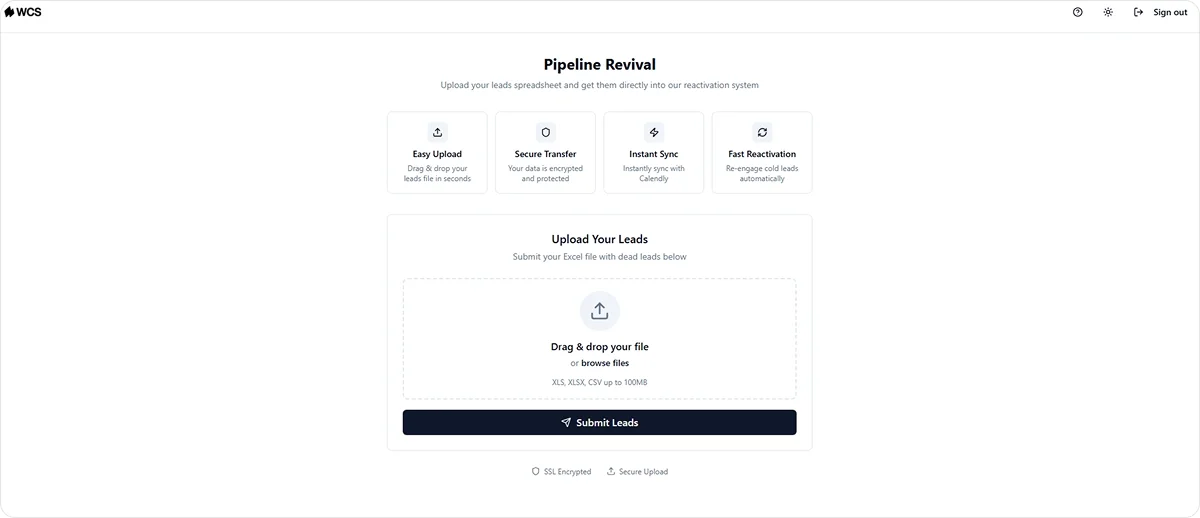
For businesses evaluating a custom CRM build, Pipeline Revival works alongside your existing setup rather than replacing it. It handles the outreach and follow-up layer that most CRMs do not cover natively, keeping your pipeline active without your team managing each contact manually. This is where AI sales automation produces the most direct return on a pipeline that already has data in it.
Your contact data, deal history, and pipeline information stay within your own environment. Every client system runs on a fully isolated AWS tenant, separate from public AI models and other users on the platform. Pricing is per organization, not per seat.
If your pipeline has data your team is not actively working, that is exactly the problem the discovery conversation is built to address.
Contact the We Capture Sales team to schedule yours today.
Frequently Asked Questions
What is the difference between a custom CRM and a pre-built SaaS CRM?
A custom CRM is built from scratch around your specific sales workflows, data structure, and business logic. You own the code, the data, and the architecture. A pre-built SaaS CRM is a subscription-based platform configured to fit your workflows as closely as the tool allows. The core difference is ownership and fit.
When does a custom CRM make more sense than a pre-built platform?
When your sales process is specific enough that a pre-built platform requires significant workarounds, when your team is growing fast enough that per-seat pricing is becoming a meaningful expense, or when your data cannot sit on shared infrastructure for compliance or competitive reasons. If a pre-built platform handles your workflows cleanly, start there.
Can you migrate from a pre-built CRM to a custom one later?
Yes, but it is not a simple process. Your contact data, deal history, and pipeline records can be exported and imported into a custom system. The harder part is rebuilding the workflows, automations, and integrations your team relied on in the pre-built platform.
The migration is manageable with a capable development partner, but it takes time and planning. Factoring in a potential migration when you first choose a pre-built CRM is worth doing, even if you do not plan to move immediately.


