




The global AI automation market is valued at $169.46 billion in 2026, and 88% of organizations now use AI automation in at least one business function. The question for your business is no longer whether to automate. It is where to start and which opportunities are actually worth the investment.
This article covers seven AI automation business opportunities producing real returns for B2B businesses in 2026, what each one looks like in practice, and how to identify the right starting point for your operation.
Key Takeaways
- AI automation delivers the fastest returns on processes your team already does on repeat, not new workflows you are building from scratch
- Your first automation project does not need to be ambitious. One well-executed process produces more value than five half-built ones
- Sales follow-up, content creation, market intelligence, and knowledge management are where B2B teams are seeing the clearest, most measurable results right now
- A custom AI system built around your actual workflows will outperform a generic platform every time, because it does not require your team to adapt to the tool
- The right starting point is usually obvious. It is the process your team complains about most, not the one that sounds most impressive to automate
What Makes an AI Automation Opportunity Worth Considering
Not every automation opportunity is worth the same attention. Some look promising on paper but take 18 months to show anything measurable. Others solve a real problem in your operation within weeks. The difference usually comes down to how well the opportunity fits the three factors below:
- High process volume: If a task happens once a month, automating it recovers very little time, even when it works well. The processes worth targeting are the ones consuming 5, 10, or 20 hours a week across your team: manual outreach, social content production, and sorting incoming support requests. The higher the volume, the faster the return.
- A consistent pattern: AI handles variation better than rule-based tools, but it still needs a recognizable process to work from. Your sales follow-up sequence has a clear, repeatable shape. Your strategic brainstorm does not. If the steps change every time depending on who is involved or what the situation calls for, hold off on automating it for now.
- A process your team already knows is costing them time: The best automation opportunities do not require much investigation. They are the tasks your team repeats daily without adding real judgment to them, the ones people mention when you ask where their time actually goes. If your team can name it without thinking twice, that is where to start.
According to PwC's 2026 AI Business Predictions, technology accounts for roughly 20% of what makes an AI automation initiative successful. The other 80% comes from redesigning the work around it. Picking the right opportunity matters, but so does thinking through how your team operates once the automation is running.
7 AI Automation Business Opportunities To Consider in 2026
The seven opportunities below are where B2B teams are seeing the strongest returns in 2026. They sit closest to revenue and day-to-day operations, which is exactly why they tend to move the needle fastest.
1. Sales Pipeline Automation
If your business has been running for a few years, there are almost certainly contacts in your pipeline that went quiet: leads that showed early interest, past customers that churned, prospects that never converted after an initial conversation.
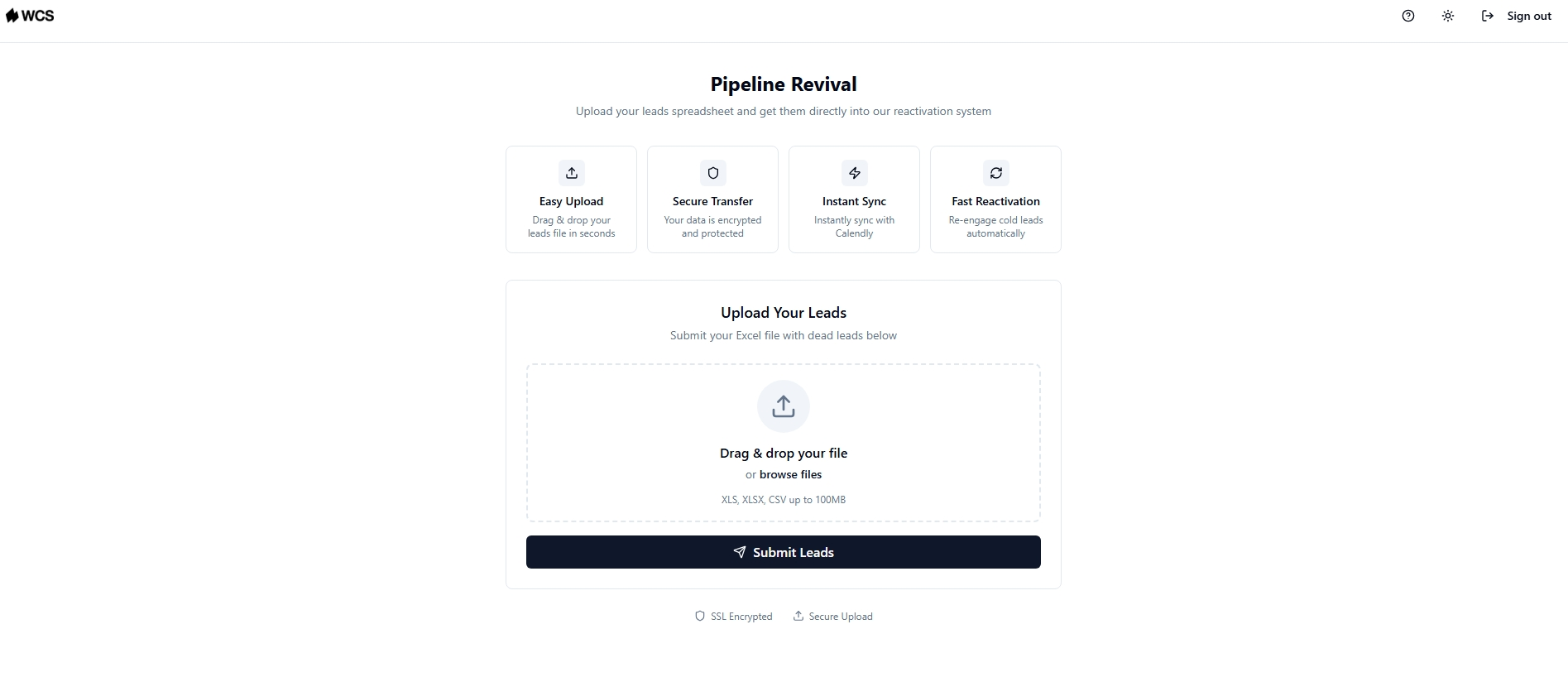
Sales pipeline automation pulls that contact data from a CRM or CSV file and runs targeted email and SMS sequences that adjust based on how each contact responds. A contact who opens an email twice gets a different follow-up from one who has not engaged at all, which is exactly what follow-up automation solutions are designed to handle. Contacts who respond get routed to a booking link or directly to your website without anyone on your team stepping in.
For example, a purpose-built pipeline revival system can ingest existing CRM or CSV data, run sequences that adapt based on open rates and response rates, and route engaged prospects to a booking link or your website without manual handoff, freeing your team to focus on conversations that are already warm. Pair that with a solid approach to turning cold leads into hot prospects and your pipeline starts working harder without adding headcount.
2. Social Media Content Creation and Scheduling
Keeping a consistent social media presence sounds manageable until your team is also trying to run a business. It is usually the first thing that gets pushed when your week fills up.
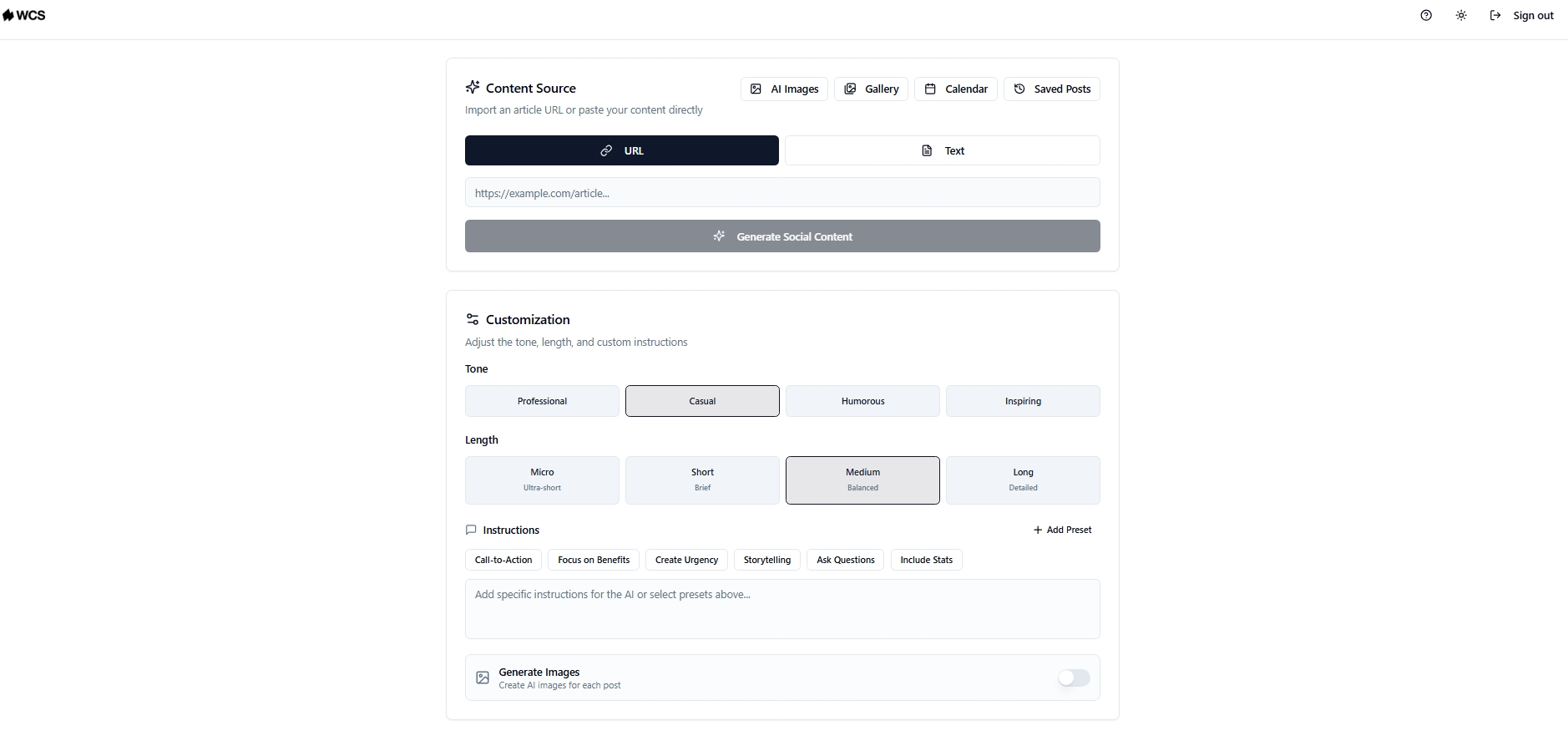
AI social content tools generate branded posts from a URL or a block of text, produce platform-specific variations for each channel, and organize everything into a content calendar your team can work from. Rather than writing from scratch each week, your team reviews the content and copies it manually into each platform.
Some platforms generate posts with AI-produced images and relevant hashtags from a URL or custom text input across Instagram, X, Facebook, and LinkedIn, with everything organized in a calendar your team posts from directly.
For a business that needs consistent output without dedicating headcount to it, that is a practical starting point and one of the more straightforward AI marketing automation wins available to a lean team.
3. Market Intelligence and Competitor Monitoring
Tracking competitor activity, identifying accounts showing buying signals, and flagging industry developments that create outreach opportunities is a full-time job. Few businesses have someone dedicated to it.. That intelligence exists, but collecting it manually across news feeds, job boards, and company pages takes more time than most teams have.
AI market intelligence tools monitor those sources continuously. When a target account posts jobs signaling growth, when a competitor adjusts pricing, or when a relevant industry development creates a timely opening, the system surfaces it without anyone spending hours on manual research.
A tool like this typically works through web scraping, pulling competitor activity and contact data filtered by industry and location, and delivering clean CSV exports your team can act on without additional formatting or cleanup work.
4. Internal Knowledge Management
Years of accumulated knowledge tend to live across old email threads, shared drives, internal documents, and the heads of people who have been with the company the longest. When a team member needs that information, they either know who to ask or they spend time hunting for it across multiple tools.
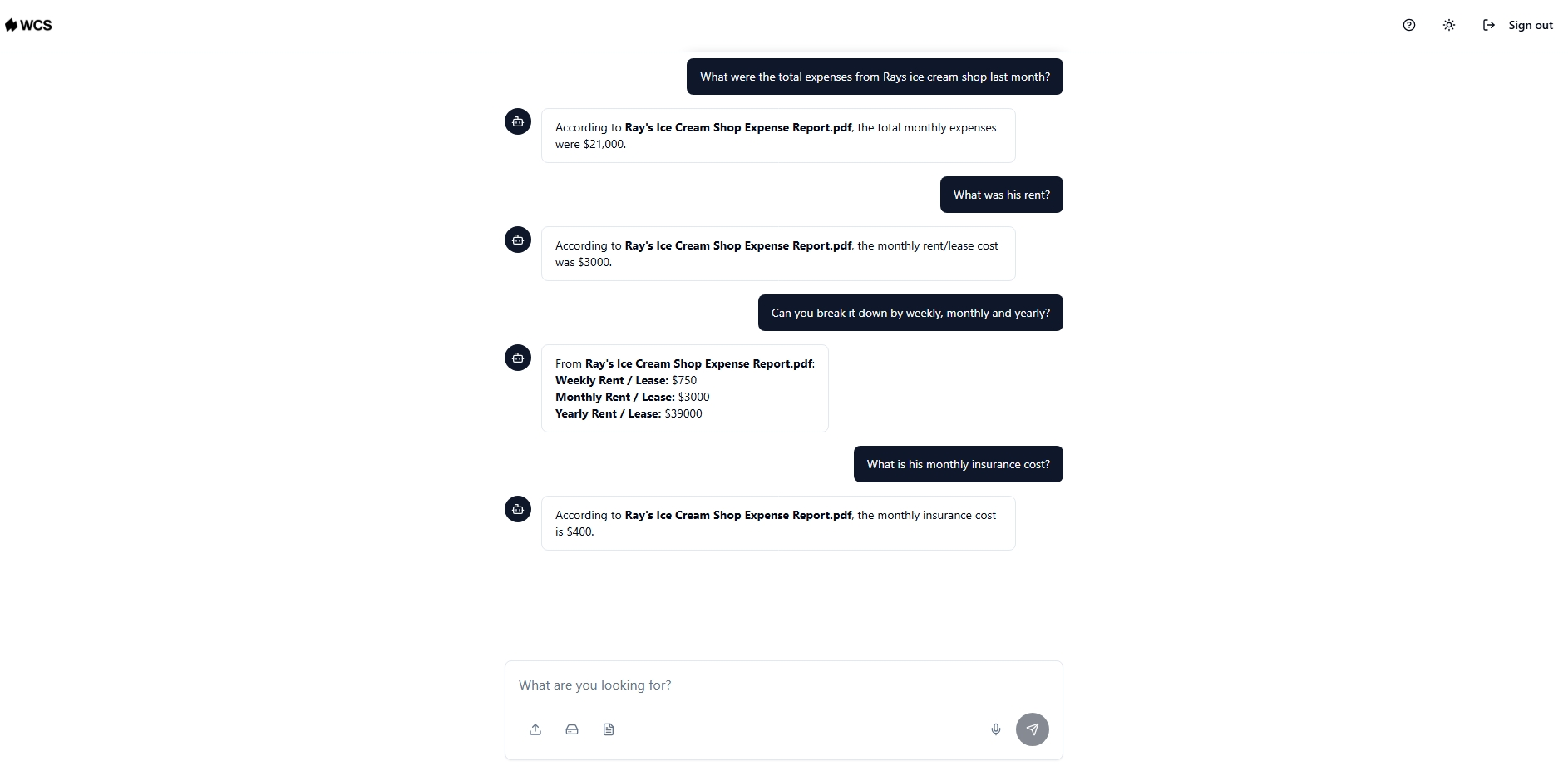
AI knowledge management centralizes that information and makes it available to both your team and the AI systems running your workflows. A new sales rep can pull up internal product knowledge without interrupting a senior colleague. An AI workflow can reference a current pricing document rather than working from something uploaded two years ago.
Rivian used NotebookLM to build a centralized knowledge base with grounded, source-linked responses, reducing repetitive internal inquiries and saving employees time across the organization. The principle applies directly to B2B teams carrying the same scattered-knowledge problem at a smaller scale.
The most practical implementations function as a private AI database connected to your existing file types, with every response source-linked so your team can verify where the information came from. We Capture Sales's Knowledge Cloud works exactly this way. Your internal knowledge stays on private infrastructure with no public internet access, which matters when your business handles client data or proprietary processes you cannot afford to expose.
5. Customer Support Triage and Ticket Routing
When support requests come in at volume, someone on your team has to read each one, figure out what it is about, decide how urgent it is, and send it in the right direction. At low volume, that is manageable. As your request volume grows, it turns into a full-time job before your team can even get to the actual solving.
AI support triage reads incoming tickets, detects intent and urgency from the language used, classifies the request type, and routes it to the right team or triggers an automated response for common queries. A billing question goes one direction. A technical issue goes another. A message with an urgent or frustrated tone gets flagged for immediate human attention.
The practical outcome is faster first response times, fewer misroutes, and a support team that focuses on the cases that genuinely need a person rather than spending the morning working through a queue. For businesses where support is handled by a small team wearing multiple hats, that recovered capacity goes a long way.
6. Financial Reporting and Anomaly Detection
Traditional financial reporting is backward-looking by design. By the time a monthly report lands in front of leadership, the decisions it should have informed have already been made on incomplete information.
AI financial automation changes that timeline. Systems analyze transaction data as it comes in, flag spending that falls outside normal patterns, and hold expenses that do not match an approved purchase order for review before they become a problem. Rather than discovering an irregularity during a quarterly audit, your team gets a prompt the same day it happens.
For businesses, the most practical starting point is anomaly detection on existing financial data. No overhaul required. The system works with what is already there and surfaces the things that need a second look, which is usually enough to prevent the errors that cost the most.
7. HR Onboarding and Document Management
Onboarding a new hire involves more coordination than it looks like from the outside. Collecting documents, validating completeness, routing tasks to IT, finance, and operations, sending reminders when something is missing, making sure everything is signed before day one. Done manually across multiple hires at once, it becomes one of the most time-consuming administrative workflows in any growing business.
AI onboarding automation handles the coordination layer:
- Validates that submitted documents are complete and correctly formatted
- Routes tasks to the relevant departments automatically based on the hire's role and start date
- Sends reminders to the new hire or internal teams when action is needed
- Flags exceptions for HR to review rather than requiring HR to monitor every step manually
The decision-making, approvals, and relationship-building stay with your people. The coordination runs automatically. For a business onboarding three or four people a month, the time recovered from manual follow-ups alone justifies the investment.
How to Evaluate Which Opportunity Fits Your Business First
Looking at seven opportunities at once can make automation feel like a larger project than it needs to be. You do not need to map your entire operation before getting started. Pick one process, automate it well, and build from there.
Three questions worth answering before you commit to anything:
- Where does work pile up most visibly in your business? Unanswered follow-ups, inconsistent social posting, support requests sitting unrouted, invoices waiting on approval. You probably already know the answer without thinking too hard about it.
- Is the process consistent enough to automate? If your team can write down the steps from memory and those steps do not change depending on who is involved, the process is ready. If the steps shift every time, keep a person on it for now.
- What would your team do with that time back? The goal is not automation for its own sake. It is freeing up capacity for work that actually moves your business forward.
How We Capture Sales Helps You Build AI Business Automation
Knowing which processes to automate is the easy part. Getting them to work together without managing five separate tools, maintaining integrations, or starting over six months later is where things get harder for your team.
We Capture Sales builds a single custom AI system around the functions your business actually needs. Rather than handing you a platform your team has to figure out on their own, every engagement starts with a discovery conversation. That conversation maps your workflows, identifies where automation would have the most impact, and determines what a practical build looks like before anything goes live.
Four products directly address the automation opportunities covered in this article:
- Pipeline Revival ingests your existing CRM or CSV contacts and runs email and SMS sequences that adapt based on open rates and response rates, routing engaged prospects to a booking link or your website without any manual handoff from your team
- Social AI generates branded posts from a URL or text input across Instagram, X, Facebook, and LinkedIn, complete with AI-produced images and hashtags, organized in a content calendar your team copies and posts to each platform manually
- Market Miner scrapes competitor activity and contact data filtered by industry and location, delivering clean CSV exports your team can act on without spending hours on manual research
- Knowledge Cloud stores your internal business knowledge in a private AI database connected to your files, source-linked and fully private, so every AI system running your workflows draws from accurate, current information
Everything runs on isolated, private AWS infrastructure. Your data stays yours and never touches a public AI model. The system gets refined after go-live as your processes change.
If you are looking at this list and wondering where to start for your specific business, that is exactly what the discovery conversation is for.
Reach out to the We Capture Sales team and schedule a meeting today.
Frequently Asked Questions
What is AI business automation?
AI business automation uses artificial intelligence to handle repetitive, coordination-heavy workflows without manual input at every step. Unlike rule-based automation, AI systems adapt based on what actually happens, making them useful for processes that involve variable inputs, multiple handoffs, or decisions that change depending on context.
Which AI automation opportunity has the fastest return?
Sales pipeline automation and customer support triage tend to show results the fastest because they work on contacts and requests already in your pipeline. Content and knowledge management take a little longer as the system builds familiarity with your brand and internal data. Starting with one specific process rather than automating everything at once consistently produces faster, cleaner results.
Do you need a technical team to implement AI business automation?
Not necessarily. The practical implementations that work are built around your existing workflows and data. What matters more than internal technical capability is a clear picture of which process you are starting with and what a successful outcome looks like for your business.
How is a custom AI system different from an off-the-shelf automation tool?
An off-the-shelf tool is built for a general use case and configured to approximate your needs. A custom system is built around how your business actually operates. The difference tends to show up in adoption rates, accuracy, and how well the system holds up as your workflows change over time.


