




If your team has tried marketing automation before and it did not produce what you expected, the tool is rarely the reason. What went wrong happened before the first sequence ever fired. According to Gartner, organizations will abandon 60% of AI projects due to insufficient AI-ready data. Getting implementation right comes down to sequencing: what you do before you deploy matters as much as what you deploy.
This article covers what to put in place before implementation, how to roll out marketing automation and AI in phases, and how to measure whether it is working.
Key Takeaways
- Most marketing automation implementations fail because of poor data quality and unclear success metrics, not because of the tools
- The process worth automating first is the one running at the highest volume with the most consistent pattern
- Deploying in phases produces faster, cleaner results than trying to automate multiple functions at once
- Automation handles execution. Defining what to automate, reviewing outputs, and adjusting when performance slips still needs a person
- A clear success metric before deployment is what separates an implementation that improves over time from one that runs quietly without anyone knowing if it is working
Why Most Marketing Automation Implementations Fail
If your team has tried automation before and it did not stick, the problem is almost never the platform. It is the sequence. Teams pick a tool, configure it quickly, and move on before the foundations are ready. The automation runs, outputs are inconsistent, adoption drops, and nobody is quite sure whether it is working or not.
Three patterns show up consistently in implementations that do not deliver:
- Starting with a tool instead of a workflow: Buying a platform before defining what process it is automating puts the tool in charge of the implementation rather than your team
- Poor data going in: Automation tools produce outputs based on the data they receive. Duplicate contacts, outdated records, and missing fields produce unreliable sequences and inaccurate reporting regardless of how capable the tool is
- No defined success metric: Deploying automation without a specific, measurable outcome makes it impossible to know whether the implementation is working or quietly underperforming
What To Set in Place Before Implementation Starts
Three things need to be in place before implementation begins. Getting these right prevents the most common and expensive mistakes.
1. Define the Specific Outcome You Want
The outcome you define before implementation determines everything that follows: which process to automate first, which tool fits that process, and how you know whether it is working. Without a specific, measurable result in mind, your team ends up configuring a platform around a vague goal and wondering why the results are hard to read.
A few examples of what a specific outcome looks like:
- Reduce lead response time from 48 hours to under five minutes
- Increase follow-up sequence completion rate from 30% to 80%
- Generate 20 pieces of social content per week without adding headcount
The outcome determines which process to automate first and which tool fits that process. Without it, your team ends up configuring a platform around vague goals and wondering why the results are hard to measure.
2. Clean and Centralize Your Data
Before you deploy any marketing automation tool, audit your contact database for duplicates, outdated records, and missing fields. Centralize data into a single source your automation tools can draw from.
A few practical steps worth taking before deployment:
- Remove duplicate contact records across your CRM and outreach tools
- Standardize field formats across name, email, phone, and company fields
- Verify email addresses and flag invalid formats before they enter a sequence
- Connect your CRM to your outreach tools so contact data flows without manual updates
3. Map the Workflow Before You Automate It
If your team cannot describe the current workflow in plain language, you are not ready to automate it. Map each step: who does what, when, and based on what trigger.
Look for the step where the process breaks down manually. A step that requires someone to chase a colleague, check a spreadsheet, or make a call based on incomplete information is where automation produces the most return.
If you’re working through this, understanding which AI business process automation functions produce the most measurable returns is a useful reference before committing to any specific tool.
How to Implement Marketing Automation and AI in Phases
Trying to automate your entire marketing operation at once is one of the more reliable ways to end up with a system nobody uses. Each new tool adds integration complexity, and when something goes wrong, it is hard to know which part of the stack caused it.
A phased approach removes that problem. You get one process running cleanly before adding the next, which means you know what is working and what needs adjusting at every stage.
Phase 1: Automate the Highest-Volume, Most Consistent Process First
The right starting point is the process your team runs most often with the most predictable pattern. For most B2B marketing teams, that is follow-up outreach or content scheduling. Both run at high volume, both have a consistent enough pattern for a system to handle, and both produce visible results within weeks rather than months.
For outreach, start with your existing contact database and run sequences that adapt based on how each contact responds:
- A contact who opens twice gets a different follow-up from one who has not engaged
- Engaged contacts get routed to a booking link or your website without anyone on your team stepping in
- Contacts who do not respond stay in the sequence until they do or opt out
We Capture Sales's Pipeline Revival handles this directly. It ingests your existing CRM or CSV contacts and runs email and SMS sequences that adapt based on open rates and response rates, routing engaged prospects to a Calendly booking link or your website without manual handoff. This is where follow-up automation produces the most immediate return on contacts already in your pipeline.
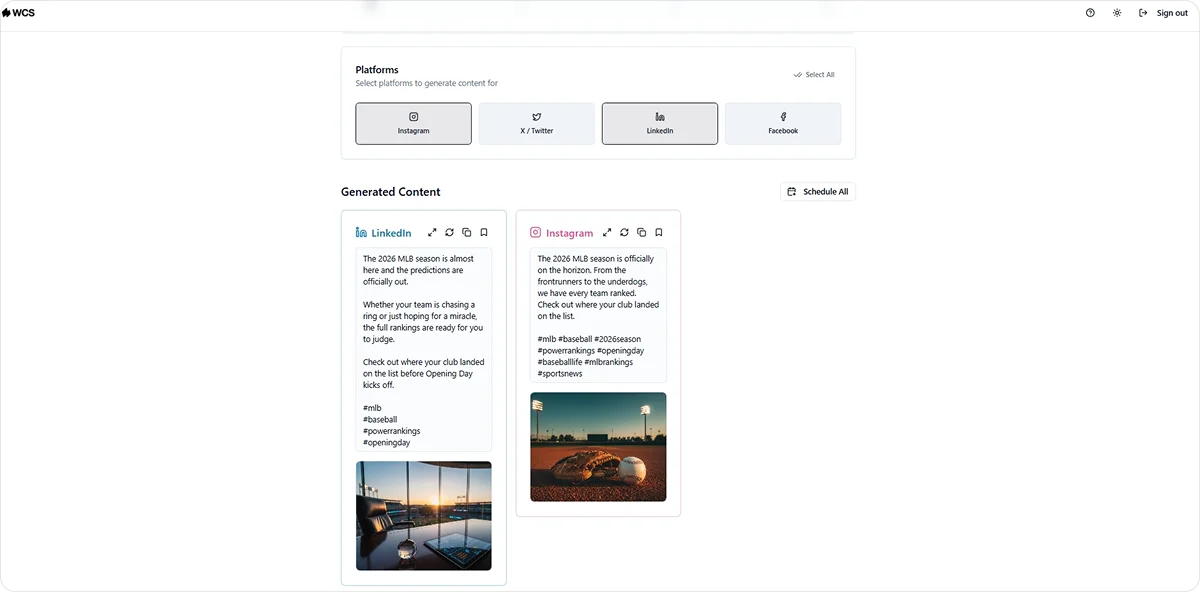
For content, start by generating platform-specific posts from a URL or text input and organizing them into a calendar that your team posts from manually. Getting consistent content output running without your team writing from scratch every week is a measurable win at this stage.
We Capture Sales's Social AI handles this across Instagram, X, Facebook, and LinkedIn, generating branded posts with AI-produced images and relevant hashtags, organized in a content calendar your team copies and posts manually.
Phase 2: Add Lead Scoring and Market Intelligence
Once your outreach and content automation are running cleanly, the next layer is qualifying who your team focuses on and identifying which accounts are worth targeting.
AI lead scoring analyzes contact behavior, engagement history, and firmographic data to surface the prospects most likely to convert. Your team stops working an undifferentiated list and starts focusing on the contacts showing the clearest buying signals.
Market intelligence runs in parallel. Rather than your team manually tracking competitor activity, job postings, and industry signals, an automated system monitors those sources continuously and surfaces what your team needs to act on.
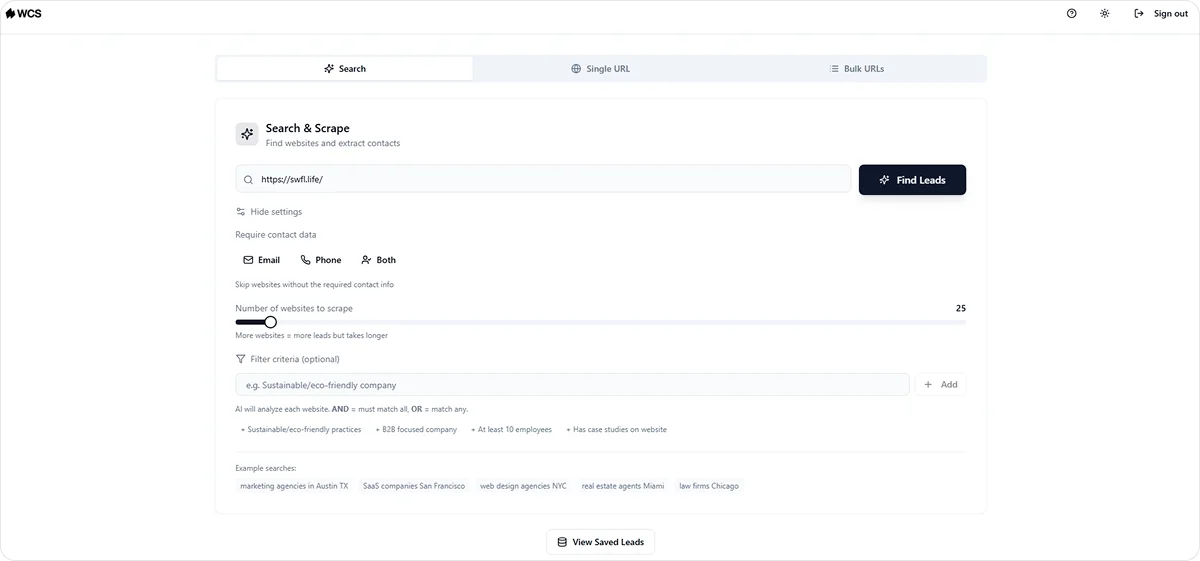
We Capture Sales's Market Miner handles this through web scraping:
- Pulls competitor activity and contact data filtered by industry and location
- Delivers clean CSV exports your team can load into an outreach tool directly
- Runs continuously so your team always has current prospect data rather than a list compiled months ago
For teams building out their AI marketing automation stack, this phase is where outreach quality improves significantly because your team is working from better data rather than more data.
Phase 3: Connect Your Knowledge Base and Internal Systems
By month three, your outreach, content, and lead qualification are running. The final phase is making sure every automated system draws from accurate, current internal information rather than data scattered across drives, email threads, and the heads of long-tenured staff.
Centralizing your internal knowledge into a private, queryable database does two things:
- Your team can access product information, pricing, and process documentation without interrupting a senior colleague
- Your automated systems pull from current information rather than something uploaded two years ago
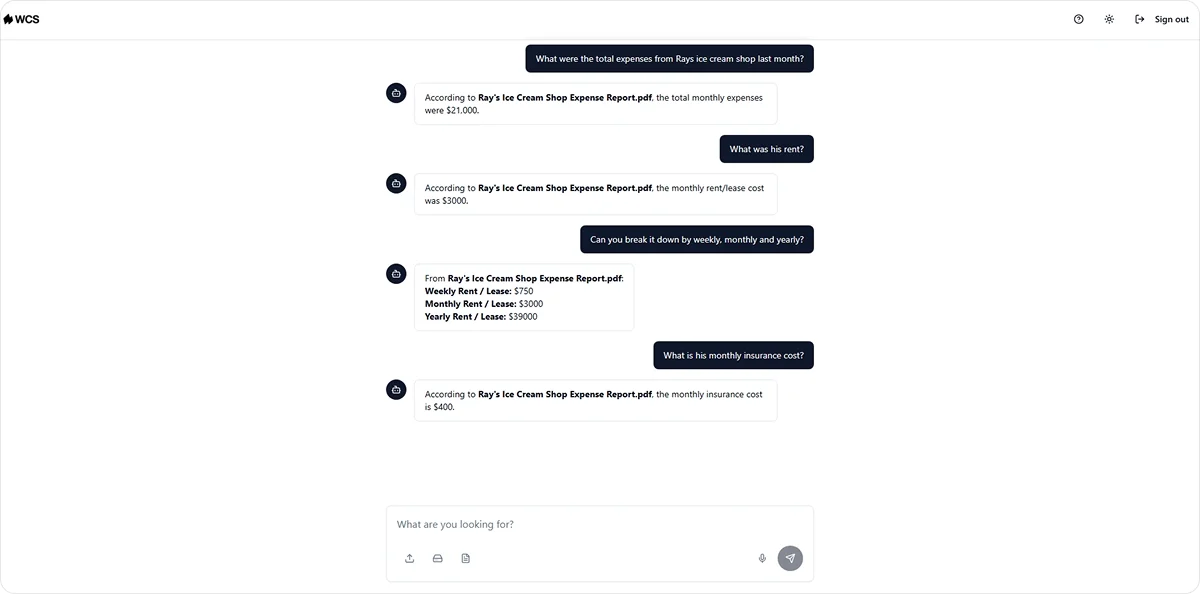
We Capture Sales's Knowledge Cloud handles this for B2B teams. It stores your internal business knowledge in a private AI database connected to your files, source-linked and fully private, so every system running your workflows draws from accurate, current information.
This is also the phase where deeper integrations between your CRM, outreach tools, and internal systems get built, so data flows cleanly across your full marketing stack without manual transfers or disconnected records.
How to Measure Whether Your Implementation Is Working
Once your automation is live, you need a way to know whether it is actually delivering. The mistake most teams make is checking the wrong metrics or not checking at all. Here are three worth tracking from day one:
- Output volume: Is the automation producing more output than your team could manually? Content pieces per week, follow-up sequences completed, prospects contacted per day. If the volume is not increasing, the automation is not doing its job
- Engagement quality: Are open rates, response rates, and conversion rates holding up as volume increases? Volume without engagement means your sequences are running but not landing. That is a signal to review the messaging, the targeting, or both
- Team time recovered: How many hours per week has your team stopped spending on the automated process? This is the clearest signal that the automation is working as intended. If your team is still doing the same manual work alongside the automation, something in the setup needs fixing
If any key metric stagnates or declines after two to three months of implementation, that is the signal to investigate the tool, the implementation, or the workflow design. Do not let underperforming automation run on autopilot.
Review performance quarterly at minimum. As your workflows evolve, the automation needs to evolve with them. A sequence that worked well six months ago may need new messaging, updated contact criteria, or a different routing logic as your market and your team change.
Common Mistakes to Avoid When Implementing Marketing Automation and AI
Even well-planned implementations run into problems. These four mistakes are the most common and the most avoidable:
Automating a broken process
If the manual version of a process is not working, automating it produces the same poor output at higher volume. Before you automate anything, make sure the process itself is sound. If your follow-up emails are not converting manually, the problem is the messaging, not the volume. Fix the process first, then automate it.
Deploying too many tools at once
Each new tool adds integration complexity and makes it harder to isolate what is working. If performance drops after deploying three tools simultaneously, your team has no way of knowing which one caused it. Start with one, get it running well, then add the next.
Skipping the data audit
This comes up in phase one and it is worth repeating here because teams skip it consistently. Your automation tools produce outputs based on the data they receive. A contact list full of duplicates, invalid emails, and outdated job titles produces bounced sequences and wasted outreach effort regardless of how well the tool is configured.
Not defining ownership
Someone on your team needs to own the automation. That means monitoring outputs regularly, flagging when performance slips, and making adjustments before small issues become expensive ones. Automation without ownership runs until something breaks, and by then the damage is already done.
How We Capture Sales Helps B2B Teams Implement AI Marketing Automation
Getting marketing automation running well is harder than most vendors make it look. Most teams that struggle with implementation are not dealing with a tool problem. They are dealing with a sequencing problem: the wrong process got automated first, the data was not ready, or there was no clear definition of what success looked like.
We Capture Sales approaches implementation differently. Every engagement starts with a one-on-one discovery conversation that maps your current workflows, identifies which process to automate first based on volume and pattern consistency, and scopes the build before any development begins.
The three phases covered in this article map directly to how We Capture Sales builds for B2B teams:
- Phase 1 is handled by Pipeline Revival for outreach and Social AI for content production, both running on your existing contact data from day one
- Phase 2 is handled by Market Miner, pulling competitor activity and prospect data filtered by industry and location so your team focuses outreach on the accounts most worth targeting
- Phase 3 is handled by Knowledge Cloud, centralizing your internal business knowledge in a private AI database so every system running your workflows draws from accurate, current information
Every client system runs in a fully isolated AWS environment, separate from public AI models and other users on the platform. Your data stays within your environment, and pricing is per organization rather than per seat, so costs stay predictable as your team grows.
If your team is ready to start implementation but not sure which process to begin with, the discovery conversation is where that question gets answered.
Contact the We Capture Sales team to schedule a meeting today.
Frequently Asked Questions
What is the first step when implementing marketing automation and AI?
Define a specific, measurable outcome before choosing any tool. Not "improve efficiency" but a result your team can track: a faster lead response time, a higher follow-up completion rate, or a consistent content output without adding headcount. That outcome determines which process to automate first and which tool fits that process.
How long does it take to implement AI marketing automation?
A focused first phase covering outreach or content automation typically takes two to four weeks to deploy and another two to four weeks to stabilize. The full three-phase implementation covered in this article runs three to six months, depending on the complexity of your workflows and how quickly your team moves through each phase.
What data do you need before implementing marketing automation?
A clean, centralized contact database with standardized field formats, verified email addresses, and no duplicate records. Your CRM should be connected to your outreach tools so contact data flows without manual updates. The cleaner your data going in, the more reliable your automation outputs will be from day one.


