





Building an AI productivity stack usually starts with one tool and grows from there. A task manager here, an AI assistant there, with a knowledge base added six months later.
By the time the stack is complete, the monthly bill is significantly higher than expected, with none of the tools sharing data.
The per-seat pricing model is where the price adds up, and the more employees you add to each subscription, the more expensive it will be.
This article breaks down what AI productivity tools cost in 2026, what pricing pages don't show, and why a bundled platform at a flat organization rate delivers a better return.
Key Takeaways
- Per-seat pricing compounds with every new hire across every subscription in the stack, making the monthly cost higher than any single tool's headline price.
- Hidden costs, including integration overhead, training time, and switching costs, consistently push the real monthly spend above the visible subscription total in year one.
- A bundled platform at a flat organization rate produces a lower total cost than a fragmented stack at almost any team size, and the gap widens as the team grows.
- Annual contracts on individual tools make switching costs real from day one. A monthly option is worth confirming before signing anything.
- We Capture Sales offers Our AI Office on a per-organization pricing model with a 14-day free trial and no annual contract, covering the functions that B2B operations run separately across multiple subscriptions.
What AI Productivity Tools Cost
A fragmented stack typically starts with one tool and grows from there. Each addition solves a specific problem and adds another per-seat subscription to the monthly bill.
Here is what that looks like across five or six tools, using verified pricing from primary sources:
The pricing pages stop there, but the monthly spend is higher once training time, integration overhead, and the productivity drag of switching between five different interfaces are included.
The table also understates the CRM cost. HubSpot Starter covers basic contact management and email. Workflow automation, lead scoring, and A/B testing all require Professional at $890 per month plus a mandatory $3,000 onboarding fee.
By the time a team needs workflow automation or lead scoring, the Professional tier at $890 per month is the only option, and the processes are already built around Starter. The per-seat price on the pricing page and the actual 12-month cost are rarely the same number, which is worth checking before committing to any software stack.
What the Pricing Page Leaves Out
The subscription total is only part of what a fragmented stack costs. Three expenses show up consistently in the first year, but they never appear on a pricing page.
Integration and Setup Time
Five separate tools do not share data by default. Connecting them requires configuration, testing, and ongoing fixes every time one tool updates and breaks an existing connection. Industry research puts overhead at 20 to 30 percent on top of visible tool costs.
For a stack at $980 per month, that is an additional $196 to $294 in real monthly cost during ramp-up. It repeats every time a tool gets swapped out.
Per-Seat Pricing at Scale
The $980 figure assumes 10 people. Add five more and the bill reaches $1,470. Add another five, and it reaches $1,960. The cost scales with every hire, and that compounding is what makes per-seat pricing expensive over time.
Switching and Cancellation Costs
Gartner projects that over 40% of agentic AI projects will be canceled before reaching production by the end of 2027. Mid-year cancellations on annual contracts mean paying for tools the team is no longer using. Setup time, integration work, and migration effort are sunk costs that don't appear on the original pricing page either.
Data handling practices and vendor lock-in are AI marketing automation challenges that show up after committing to a fragmented stack.
Consumption-Based Pricing
Subscription fees cover the base cost, but many AI tools also charge based on usage. API calls, tokens processed, and compute hours all generate additional charges on top of the flat monthly fee, and those charges vary depending on how heavily the team uses the product.
A month with heavy usage can cost significantly more than the headline per-seat price suggests. Confirm whether the tool charges on a consumption basis and ask for an estimate of typical monthly usage costs before signing up, not after the first invoice arrives.
What a Bundled Platform Costs
A bundled productivity platform replaces the fragmented stack with one connected system at a flat organization rate. The cost does not change as the team grows because pricing is per organization rather than per seat.
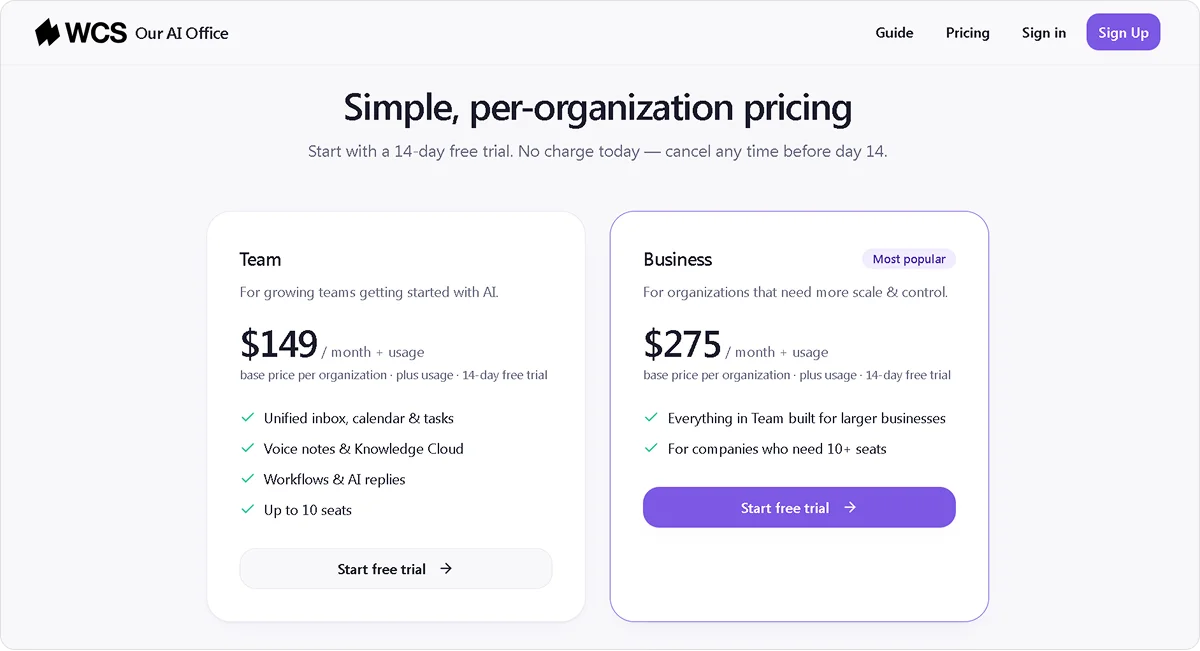
Our AI Office is We Capture Sales's bundled productivity platform for B2B teams. It covers inbox, calendar, tasks, voice notes, Knowledge Cloud, weekly review, and decisions in one environment, with Pipeline Revival, Social AI, and Market Miner available as B2B automation add-ons.
Pricing runs on two plans:
- Team plan for $149 per month plus usage: Up to 10 people, 14-day free trial, no charge upfront
- Business plan for $275 per month plus usage: For organizations that need more than 10 seats, same free trial applies
Neither plan requires an annual contract, and the full workspace is available from the start, with no setup fee or onboarding cost. The entry point is meaningfully different from a fragmented stack where each tool carries its own setup and contract requirements, which is worth considering when evaluating whether to build or buy.
Bundled vs. Fragmented: The Cost Comparison
A bundled platform at a flat organization rate changes the math on every line in the fragmented stack. Here is how Our AI Office compares to the fragmented stack covered above:
At 10 people, the subscription savings are $831 per month, rising to $1,321 at 15 and $1,685 at 20 on the Business plan, and that only accounts for the subscription fees.
The bundled platform also removes:
- The integration overhead of connecting five separate tools
- The training time for onboarding the team onto five different interfaces
- The switching costs when a per-seat tool underperforms and needs replacing
- The annual contract lock-in that makes changing tools expensive mid-year
Before signing any annual contract, it is worth running that math alongside what AI automation returns in B2B to get a complete picture of the investment.
What to Check Before Committing to Any AI Productivity Tool
Subscription fees are only part of the picture. Before signing up for any tool or stack, four factors consistently separate the ones that deliver a return from the ones that add cost without adding value.
Total Cost at Scale
Per-seat pricing looks different at 20 people than at 10. Run the math at your projected headcount in 12 months before committing to any tool in the stack. A platform that fits the budget today may become one of the largest software costs in the business by the time the team grows into it.
Contract Terms
Annual contracts make switching costs real from day one. Confirm whether a monthly option exists before signing anything. Contract flexibility matters as much as feature capability, which is a key consideration when choosing an AI tool for marketing automation or for any other function in the stack.
Native vs. Third-Party Connections
Confirm which integrations are built-in and which require a third-party layer like Zapier or Make. A tool that needs a connector to share data with the rest of your stack adds maintenance overhead that breaks every time one of the connected tools updates, and that cost does not appear on any pricing page.
Data Portability
Confirm the export process before uploading anything sensitive. Some tools make data export straightforward. Others require a support request, charge a fee, or lock data in a format that is difficult to migrate.
How Our AI Office Compares on Cost
Most productivity platforms charge per seat and require annual contracts before the team has had time to evaluate whether the tool actually fits. Our AI Office works differently:
- Per-organization pricing: The monthly cost stays flat regardless of how many people join the team
- No annual contract: Both plans come with a 14-day free trial and no upfront commitment
- No integration overhead: Inbox, tasks, calendar, knowledge, and outreach share data natively, so there is no connector layer to maintain or fix when tools update
For teams that need something configured specifically around their workflows, We Capture Sales handles that directly through a demo conversation before any development begins.
Start your free trial or book a demo with the We Capture Sales team to get started.
Frequently Asked Questions
How much should a small business budget for AI productivity tools?
It depends on how the stack is structured. Per-seat tools at $10 to $25 per seat across five or six subscriptions add up to $500 to $1,500 per month for a team of 10. A bundled platform with per-organization pricing changes that math significantly.
The more useful question before budgeting is how many people will use the tools and whether that number is likely to grow.
Is it worth paying for multiple AI tools or consolidating into one?
It depends on how the tools connect. Five tools that don't share data require manual coordination, which adds work rather than removing it. A connected platform handles that coordination automatically, which changes both the cost calculation and the day-to-day experience.
What is the biggest mistake small businesses make when buying AI tools?
One of the biggest mistakes a small business can make is signing annual contracts before the team has had time to evaluate whether the tool fits how they work. A tool that looks useful in a demo may sit unused after onboarding, but the annual commitment means paying for it regardless.
Starting with a monthly plan or a free trial before committing to a year removes that risk entirely.


