




AI workflow automation examples range from sales outreach sequences that adapt based on contact behavior to invoice processing that validates and routes approvals without anyone touching a spreadsheet.
McKinsey's 2025 State of AI survey found that 88% of organizations regularly use AI in at least one business function, yet only 7% have fully scaled it across their operations. For B2B teams in 2026, the question is no longer whether to automate but which workflows to start with.
This article covers ten AI workflow automation examples to consider, what each one replaces, and what the outcome looks like in practice.
Key Takeaways
- AI workflow automation reads what is happening in a process and adapts, unlike traditional automation, which breaks when inputs change outside preset rules
- The workflows worth automating first combine high volume, a consistent pattern, and a measurable output your team can track
- The clearest returns in B2B show up in sales outreach, lead qualification, content production, market intelligence, and internal knowledge management
- AI handles the execution and coordination layer. Creative decisions, complex judgment calls, and relationship-building still need a person
- Starting with one workflow, measuring the result, and building from there consistently produces better outcomes than automating multiple functions at once
What Is AI Workflow Automation
AI workflow automation is the use of machine learning to handle the repetitive, data-dependent, and coordination-heavy steps in a business process without manual input at every stage.
Traditional automation follows fixed rules set in advance. It works until something changes outside what those rules account for. AI workflow automation reads what is happening and adjusts accordingly.
A follow-up sequence that detects a contact has visited the pricing page sends a different next message from one going to a contact who has not opened anything in two weeks. That adaptability is what separates AI workflow automation from a standard rule-based system.
Here is how the two approaches compare:
What Makes a Good AI Workflow Automation Candidate
Not every business process is worth automating. The ones that produce the fastest, most measurable returns share four characteristics:
- High volume: The process runs frequently enough that time saved compounds week over week
- Consistent pattern: The steps are predictable enough for a system to handle without a person directing every decision
- Data availability: The process generates or uses enough data for AI to learn from and make accurate decisions
- Measurable output: The result can be tracked so your team knows whether the automation is working
The process worth automating first is the one your team runs most often that also produces the most inconsistent results when done manually. Teams that have already explored AI business process automation across multiple functions will recognize this: the highest-return automations are rarely the most complex ones.
10 AI Workflow Automation Examples for B2B Teams in 2026
The 10 examples below cover different business functions. Each one includes what the workflow automates, what it replaces, and what a team can expect once it is running.
1. Sales Outreach and Follow-Up Sequences
Manual follow-up breaks down as pipeline volume grows. A rep managing 50 active contacts cannot reliably track who needs a message today, who went quiet last week, and who just visited the pricing page for the third time.
AI outreach sequences handle that tracking automatically. The sequence adapts based on what each contact does rather than firing the same message on the same schedule regardless of behavior:
- A contact who opens but does not reply gets a follow-up that approaches the conversation from a different angle
- A contact who clicks through to a specific page gets a follow-up relevant to what they looked at
- A contact who replies gets routed out of the sequence and into a direct conversation
Pipeline Revival at We Capture Sales runs this way, ingesting existing CRM or CSV contacts and running email and SMS sequences that adapt based on open rates and response rates. For B2B teams where automated follow-up is the biggest operational gap, this is almost always the highest-return starting point.

2. Lead Scoring and Qualification
Not every contact in a pipeline deserves the same attention. A contact who visited your pricing page three times this week is further along in their decision than one who downloaded a piece of content six months ago and never came back.
AI lead scoring analyzes behavioral signals, firmographic data, and engagement history to rank each contact by conversion likelihood. High-intent contacts get prioritized immediately. Contacts that do not yet fit your ICP stay in a nurture sequence until their signals change.
The result is a sales team that spends time on contacts most likely to convert rather than working through an undifferentiated list. A strong approach to turning cold contacts into active prospects before scoring begins consistently improves the quality of what the system works with.
3. Social Media Content Generation and Distribution
Producing consistent branded content across multiple channels every week is one of the most time-consuming marketing workflows for a lean B2B team. Writing posts, adapting them for each platform, and scheduling them manually consumes hours that could go toward higher-value work.
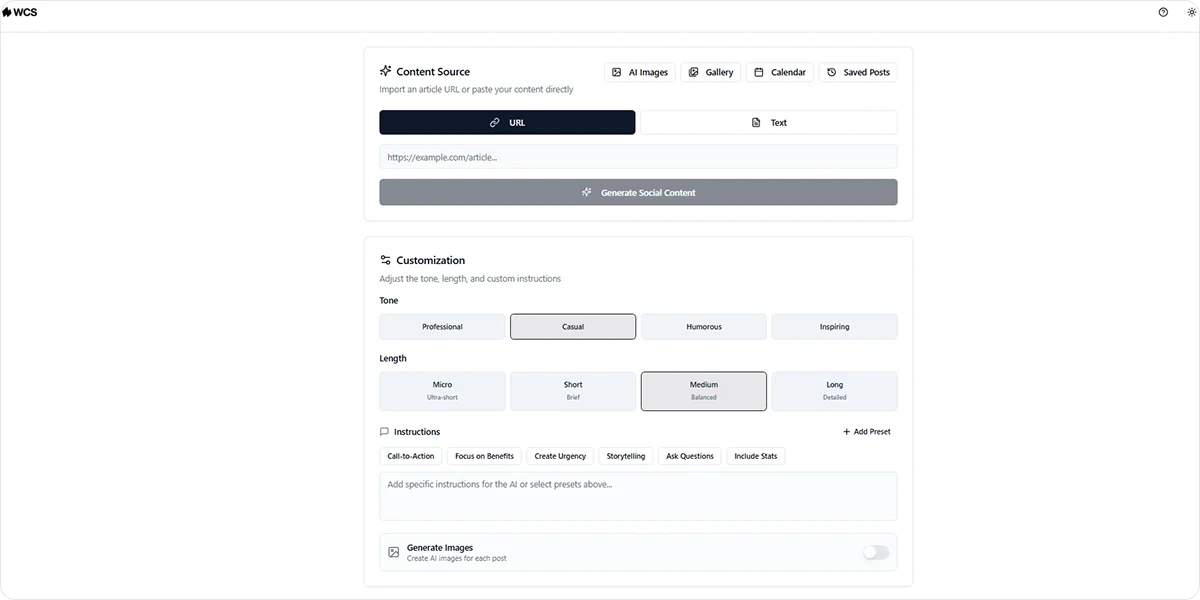
AI content automation generates platform-specific posts from a URL or text input and organizes them into a content calendar your team can review and post from directly.
Digital BackOffice, a 30-person network solutions provider, faced exactly this problem. Their team had limited time for marketing and struggled to maintain a consistent LinkedIn presence. After implementing Social AI through We Capture Sales, they increased LinkedIn engagement and recovered more than three hours per week previously spent on manual content production.
Social AI generates branded posts with AI-produced images and relevant hashtags across Instagram, X, Facebook, and LinkedIn, organized in a calendar that your team can copy and post.
4. Competitor and Market Intelligence Monitoring
Tracking competitor activity, monitoring job postings that signal buying intent, and building prospect lists from live market data is a full-time job at any real volume. Without a system handling it continuously, your team acts on information that is already weeks out of date.
AI market intelligence monitors those sources automatically. When a target account posts jobs signaling growth or a competitor changes pricing, the system flags it without anyone spending hours on manual research.
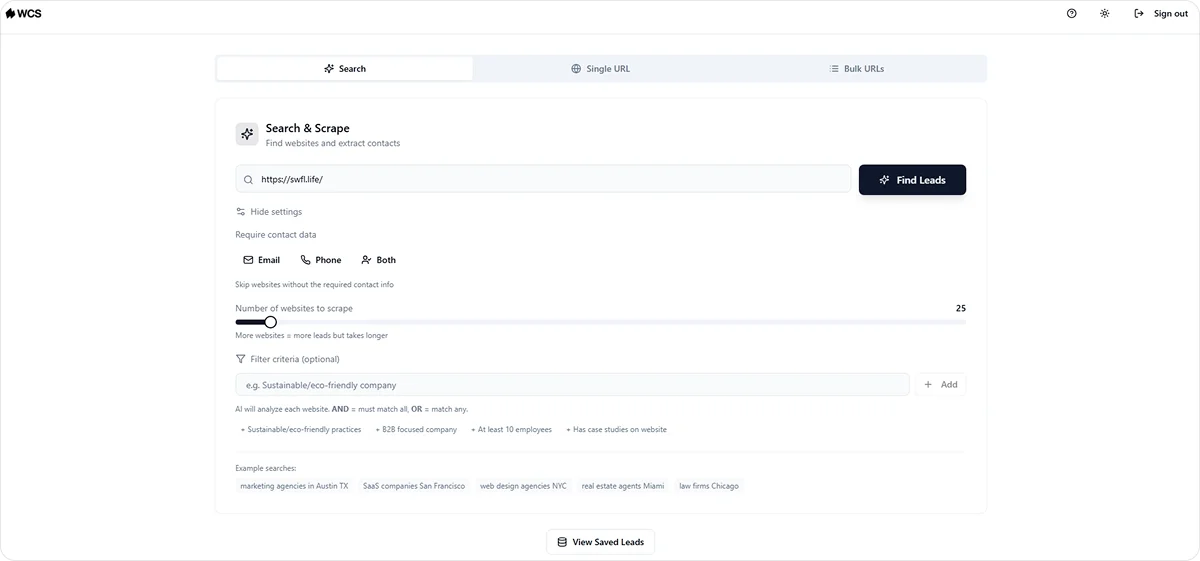
We Capture Sales’ Market Miner handles this through web scraping, pulling competitor activity and contact data filtered by industry and location, and delivering clean CSV exports your team can act on directly. For teams building prospect lists from live signals, web scraping for B2B lead generation produces more current data than any purchased database.
5. Invoice Processing and Accounts Payable
Processing invoices manually means someone on your finance team reads each one, validates the figures, matches it against a purchase order, and routes it for approval. At low volume that is manageable. As transaction volume grows, it becomes a significant bottleneck.
AI invoice processing reads incoming invoices using optical character recognition, extracts key data, validates figures against purchase orders, flags discrepancies, and routes approvals automatically. What previously took hours of manual review gets handled in minutes.
The finance team focuses on exceptions and decisions rather than routine processing, and the error rate drops because the system catches discrepancies before they cause payment disputes.
6. Customer Support Triage and Ticket Routing
When support requests come in at volume, reading each one, identifying what it is about, deciding how urgent it is, and routing it correctly consumes significant team time before any actual support work begins.
AI support triage reads each incoming request, detects intent and urgency, and routes it to the right team or triggers an automated response for common queries:
- Billing questions go to the finance team
- Technical issues go to the support engineering queue
- Urgent or frustrated messages get flagged for immediate human attention
Your support team focuses on the cases that genuinely need a person. Routine requests get handled automatically, and first response times improve without adding headcount.
7. HR Onboarding and Document Management
Onboarding a new hire involves more coordination than it appears. Collecting documents, validating completeness, routing tasks to IT, finance, and operations, and sending reminders when something is missing all consume HR time before the new hire has done a day of work.
AI onboarding automation handles that coordination layer:
- Validates that submitted documents are complete and correctly formatted
- Routes tasks to the relevant departments based on the hire's role and start date
- Sends reminders when action is needed from either the new hire or internal teams
- Flags exceptions for HR to review rather than requiring HR to monitor every step
The onboarding process runs consistently regardless of how many hires are starting simultaneously, which is where business tools for AI automation produces some of its most immediate operational returns.
8. Internal Knowledge Management and Retrieval
When a team member needs internal information, they typically search through shared drives, check a wiki that may be outdated, or interrupt a senior colleague who actually knows the answer. That process wastes time on both ends.
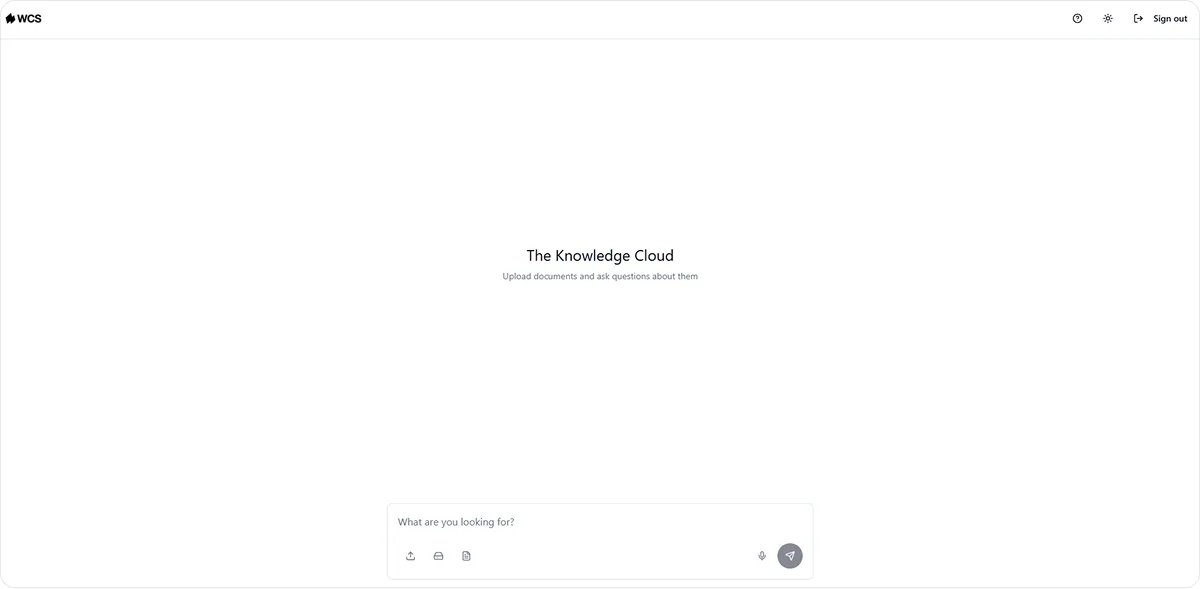
AI knowledge management makes your existing internal information queryable in real time. A team member asks a question and gets a source-linked answer drawn from your files and documents in seconds rather than minutes.
Knowledge Cloud at We Capture Sales handles this for B2B teams, storing internal business knowledge in a private AI database connected to your files, source-linked and fully private. The information does not need to be reformatted or reorganized to be findable.
9. Meeting Summarization and Action Item Tracking
Most B2B teams run a significant number of meetings every week. The notes that come out of them are inconsistent, action items get buried in follow-up emails, and decisions made in one meeting get revisited in the next because nobody documented them clearly the first time.
AI meeting automation transcribes calls in real time, generates structured summaries, extracts action items with assigned owners, and stores everything in a searchable format. A consistent record of what was decided and who is responsible gets created automatically without anyone spending 20 minutes writing it up after the call ends.
10. Pipeline Visibility and Deal Monitoring
A deal that has not moved in two weeks is not necessarily lost, but without visibility into which deals are losing momentum, your team finds out too late to act on it.
AI pipeline monitoring tracks deal activity continuously and flags signals before they become closed-lost entries:
- A contact who stopped opening emails after consistent engagement
- A deal in the same stage longer than your average cycle typically takes to close
- A prospect who visited your pricing page but did not respond to follow-up
Acting on these signals early is one of the more direct ways AI automation compresses overall cycle time, which connects to the broader topic of how AI automation reduces sales cycle length across a full B2B pipeline.
How We Capture Sales Applies AI Workflow Automation
Running multiple disconnected automation tools creates a different kind of problem: your team spends time managing the tools rather than acting on what they produce.
We Capture Sales builds a single connected system around how your specific pipeline operates, covering the workflows that matter most without requiring your team to coordinate between separate platforms.
Every engagement starts with a one-on-one discovery conversation that identifies which workflows are breaking down under volume, determines which automation would have the most immediate impact, and establishes what the build looks like before development begins.
Here is how the four products connect to the examples covered in this article:
- Pipeline Revival: Handles outreach sequencing and follow-up, running email and SMS sequences that adapt based on open rates and response rates, routing engaged prospects to a Calendly booking link or your website without manual handoff
- Social AI: Manages content generation and distribution, producing branded posts across Instagram, X, Facebook, and LinkedIn from a URL or text input, organized in a content calendar your team copies and posts
- Market Miner: Deals competitor monitoring and prospect research, pulling live contact data filtered by industry and location into clean CSV exports your team can act on directly
- Knowledge Cloud: Covers internal knowledge retrieval, making your existing business documentation queryable by any team member, with every response source-linked and verifiable
Pricing is per organization regardless of team size, and every build starts with a discovery conversation rather than a platform signup.
The right starting point is different for every business.
Schedule a discovery call with the We Capture Sales team to identify which workflow would deliver the fastest return for you.
Frequently Asked Questions
How do you know if a workflow is ready to automate?
Three signals help. The process runs at a high enough volume that manual handling is creating a bottleneck. The steps follow a consistent enough pattern that a system can handle them without human direction at every point. And you can define what a successful outcome looks like before the automation goes live. If all three are true, the workflow is worth automating.
What is the difference between AI workflow automation and traditional automation?
Traditional automation follows a fixed set of rules and struggles when inputs fall outside what those rules account for. AI workflow automation reads context and adjusts. A contact who visits your pricing page gets a different follow-up from one who has not engaged in weeks. That adaptability is what makes AI-driven workflows more reliable across processes where inputs vary.
How long does it take to see results from AI workflow automation?
It depends on which workflow you start with. Outreach and follow-up automation typically shows measurable results within the first two to four weeks because it works on contacts already in your pipeline. Content production and market intelligence take a little longer as the system builds familiarity with your specific inputs. Starting with one well-defined workflow consistently produces faster results than deploying multiple automations at once.


